The short answer
Allow about 4 Mbps of upload per video call, 2 Mbps per smart camera and 10 Mbps for regular cloud backups, then add 30% headroom. Most of the home set-ups we model need 25 Mbps of upload or less.
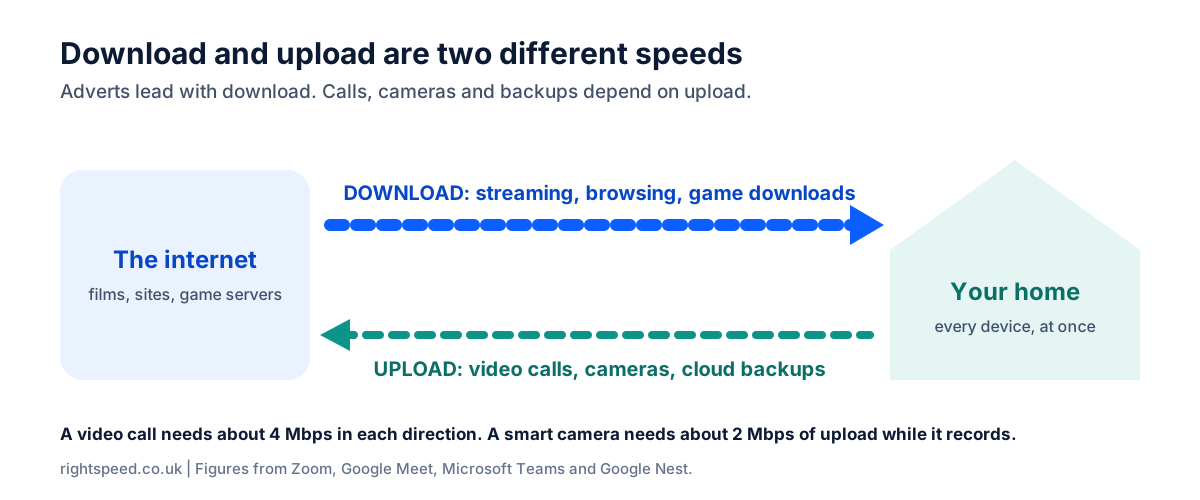
Upload and download are separate. A home with one call, two cameras and heavy uploads needs about 45 Mbps of upload but only 15 Mbps of download.
Two numbers, not one
Every broadband package has two speeds. Download is how fast data reaches you. Upload is how fast you can send it. Adverts lead with download, and on some packages the upload is far lower.
Worked example
A home that uploads a lot
Two people, one video call, two cameras and heavy uploads such as video files or full backups.
- 2 x person online4 down, 1 up
- 1 x video call4 down, 4 up
- 2 x camera0 down, 4 up
- Heavy uploads and backups0 down, 25 up
- Everything at once8 down, 34 up
- With 30% headroom, rounded up15 down, 45 up
What uses upload at home
- Video calls: about 4 Mbps each. Zoom lists 3.8 Mbps for 1080p video.
- Smart cameras and video doorbells: about 2 Mbps each while they record.
- Cloud backups and big files: they take whatever upload is free, so set some aside. We plan 10 Mbps for regular use and 25 Mbps for heavy use.
- Gaming: about 1 Mbps per player.
What smart cameras really use
| Google Nest device and setting | Upload |
|---|---|
| Nest Cam (battery or wired), High quality | 0.7 Mbps, rising to 2.0 Mbps during recorded events |
| Nest Cam (battery or wired), Max video | 1.0 Mbps, rising to about 3.0 Mbps during recorded events |
| Nest Cam Indoor (wired, 3rd gen), Max video | 3.3 Mbps |
| Nest Cam IQ, High quality | 4.0 Mbps |
Maximum upload figures published by Google, checked 16 November 2026. Other brands differ, so check the maker's own figure for your camera.
Finding the upload figure on a deal
Look past the headline number to the upload speed in the package details. If you need more than about 20 Mbps of upload, look at full fibre packages and compare the upload on each one. BroadbandSwitch.uk explains what to compare on upload and download.
Common questions
Is 10 Mbps upload enough?
For many homes, yes. A family of four with one video call and one gamer needs about 10 Mbps of upload. Add cameras or regular backups and you will want more.
Why is my upload so much lower than my download?
Part-fibre and cable connections were designed around downloading, so they give most of their capacity to it. Full fibre packages generally offer higher upload, and some offer the same speed both ways.
Does upload speed affect streaming?
No. Watching video is almost all download. Upload matters when you send: calls, cameras, backups and posting video.
How do I check my upload speed?
Most speed tests list upload separately from download. Run one next to your router and look for the upload figure in the results.
Sources
Checked against each source on 16 November 2026.
- Google. (n.d.-b). Prepare your network for Meet meetings & live streams. Google Workspace Admin Help. Retrieved 16 November 2026, from https://support.google.com/a/answer/1279090?hl=en
- Google. (n.d.-c). Learn about internet bandwidth & speed requirements for Nest cameras. Google Home and Nest Help. Retrieved 16 November 2026, from https://support.google.com/googlenest/answer/9245832?hl=en
- Microsoft. (2026, May 26). Prepare your organization's network for Teams. Microsoft Learn. https://learn.microsoft.com/en-us/microsoftteams/prepare-network
- Zoom. (n.d.). Zoom system requirements: Windows, macOS, Linux. Zoom Support. Retrieved 16 November 2026, from https://support.zoom.com/hc/en/article?id=zm_kb&sysparm_article=KB0060748