The short answer
RightSpeed adds up the speed needed by everything you say is happening at the same moment, multiplies by 1.3 for a home or 1.4 for a business to leave headroom, and rounds up. It gives you one download number and one upload number. It never rounds you up to a bigger package.
The formula
Speed needed = (sum of every activity running at once) x headroom, rounded up.
- Download and upload are worked out separately.
- Headroom is 30% for a home and 40% for a business. It covers busy evenings, Wi-Fi losses and the odd extra device.
- Results are rounded up to the next whole number up to 10 Mbps, and to the next 5 Mbps above that.
- The lowest download result shown is 10 Mbps, which is Ofcom's definition of a decent connection.
The planning figures
Where a provider publishes a figure, we use it and link to it. Where nobody publishes one, we use a planning allowance and label it as ours. The same figures are available as open data (JSON) under a CC BY 4.0 licence.
| Activity | Down (Mbps) | Up (Mbps) | Source | Notes |
|---|---|---|---|---|
| Everyday use, per person online | 2 | 0.5 | RightSpeed allowance | Web, email, social media and music. RightSpeed planning allowance. |
| HD video stream (1080p) | 5 | 0 | Netflix, YouTube | Netflix and YouTube both give 5 Mbps for 1080p. |
| 4K video stream | 25 | 0 | Netflix, YouTube | Netflix gives 15 Mbps and YouTube 20 Mbps for 4K. RightSpeed plans at 25 Mbps so a 4K stream never sits on the limit. |
| Video call (1080p) | 4 | 4 | Zoom, Google Meet, Microsoft Teams | Zoom gives 3.8 Mbps up and 3.0 Mbps down, Google Meet up to 3.6 Mbps each way, Microsoft Teams up to 4 Mbps each way at best performance. Rounded up to 4. |
| Online gaming, per player | 5 | 1 | RightSpeed allowance | Live play uses little data. Response time (ping) matters more than speed. RightSpeed planning allowance. |
| Cloud gaming (1080p at 60 fps) | 25 | 1 | NVIDIA | NVIDIA gives 25 Mbps for GeForce NOW at 1080p and 60 frames per second. Upload figure is a RightSpeed allowance. |
| Smart camera or video doorbell | 0 | 2 | Google Nest | Google lists up to 2 Mbps of upload for a Nest Cam on High quality while it records an event. Maximum quality settings can use more. |
| Staff member online | 3 | 1 | RightSpeed allowance | Email, web, cloud documents and card payments. RightSpeed planning allowance. |
| Guest Wi-Fi user | 2 | 0.5 | RightSpeed allowance | RightSpeed planning allowance. |
| Uploads and backups (home) | 0 | 0 / 10 / 25 | RightSpeed allowance | Light, regular or heavy. Cloud backups, large file transfers and posting video. RightSpeed planning allowance. |
| Uploads and backups (business) | 0 | 5 / 20 / 50 | RightSpeed allowance | Light, regular or heavy. |
Worked example
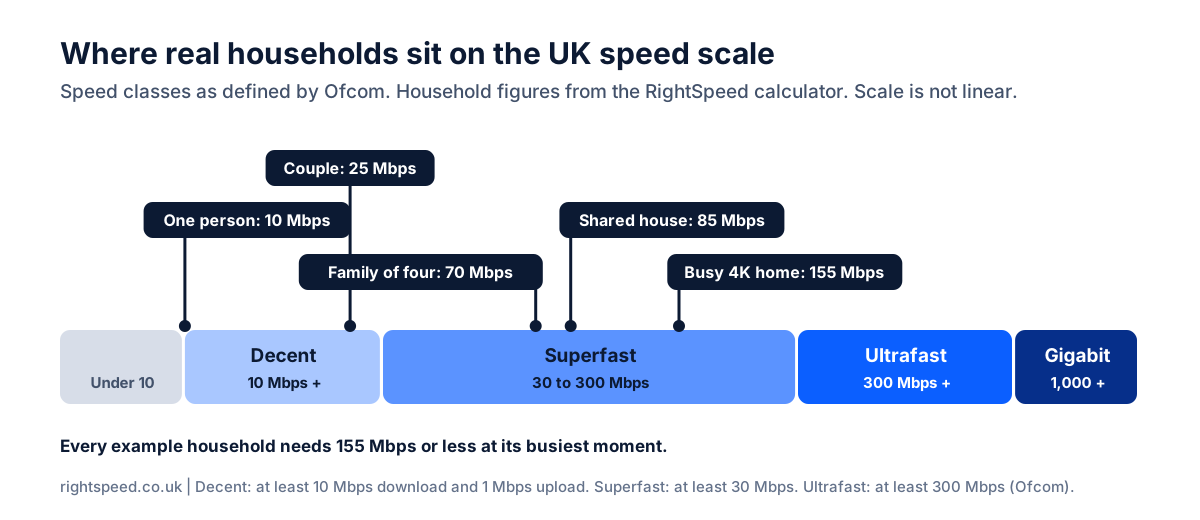
A family of four
One 4K film, two HD streams, a video call and someone gaming, all at once.
- 4 x person online8 down, 2 up
- 2 x HD stream10 down, 0 up
- 1 x 4K stream25 down, 0 up
- 1 x video call4 down, 4 up
- 1 x online gamer5 down, 1 up
- Everything at once52 down, 7 up
- With 30% headroom, rounded up70 down, 10 up
The speed classes
We place each result on Ofcom's scale: decent is at least 10 Mbps download and 1 Mbps upload, superfast is at least 30 Mbps and ultrafast is at least 300 Mbps. Gigabit means 1,000 Mbps.
What the calculator cannot know
- Your Wi-Fi. The result is the speed needed at the router. Thick walls and distance reduce what reaches each room. RouterMap helps with that.
- What is available at your address. Speeds and prices vary by postcode. BroadbandSwitch.uk shows what you can get.
- What a provider will deliver. Advertised speeds are averages. The ASA says a speed in an advert should be available to at least half of customers at peak time.
- How patient you are. More speed shortens big downloads. The result tells you how long a 100 GB download takes so you can decide what that is worth to you.
Independence
RightSpeed is a BroadbandSwitch.uk tool, and BroadbandSwitch.uk may earn a commission when someone switches through it. The calculator is built to give the lowest speed that covers what you told it. Nothing in the formula changes based on which packages pay a commission.
Change log
- Version 4.0.0, 16 November 2026. The result is now a single download and upload figure instead of a band. Cloud gaming is counted separately from online gaming. Business headroom set at 40%. Every published figure re-checked against its source, and the Microsoft Teams figures updated to the May 2026 edition of Microsoft's guidance. Sources we could not check directly were removed. Planning figures published as open data.
- Version 2.1.2, 19 February 2026. Previous release, which gave results in five speed bands.
Corrections
If a figure looks wrong or a source has changed, email editor@broadbandswitch.uk. We check every report and record what we changed here.
References
- Advertising Standards Authority. (2024, April 4). Broadband and telecoms: Speed claims. https://www.asa.org.uk/advice-online/broadband-and-telecoms-speed-claims.html
- Google. (n.d.-a). System requirements & supported devices for YouTube. YouTube Help. Retrieved 16 November 2026, from https://support.google.com/youtube/answer/78358?hl=en
- Google. (n.d.-b). Prepare your network for Meet meetings & live streams. Google Workspace Admin Help. Retrieved 16 November 2026, from https://support.google.com/a/answer/1279090?hl=en
- Google. (n.d.-c). Learn about internet bandwidth & speed requirements for Nest cameras. Google Home and Nest Help. Retrieved 16 November 2026, from https://support.google.com/googlenest/answer/9245832?hl=en
- Microsoft. (2026, May 26). Prepare your organization's network for Teams. Microsoft Learn. https://learn.microsoft.com/en-us/microsoftteams/prepare-network
- NVIDIA. (n.d.). GeForce NOW system requirements. Retrieved 16 November 2026, from https://www.nvidia.com/en-gb/geforce-now/system-reqs/
- Netflix. (n.d.). Netflix-recommended internet speeds. Netflix Help Center. Retrieved 16 November 2026, from https://help.netflix.com/en/node/306
- Ofcom. (2019). Connected Nations 2019: UK report. https://www.ofcom.org.uk/__data/assets/pdf_file/0023/186413/Connected-Nations-2019-UK-final.pdf
- Ofcom. (2023, August 8). Your right to request a decent broadband service: What you need to know (last updated 19 June 2026). https://www.ofcom.org.uk/phones-and-broadband/access-to-decent-broadband/broadband-uso-need-to-know
- Zoom. (n.d.). Zoom system requirements: Windows, macOS, Linux. Zoom Support. Retrieved 16 November 2026, from https://support.zoom.com/hc/en/article?id=zm_kb&sysparm_article=KB0060748